Most pricing is the same every day, and that’s fine. But some isn’t. A party tent costs more over a weekend than midweek. A “Weekender” package only makes sense if it starts on a Friday. An evening slot is priced differently from a morning one. In TWICE Commerce those rules don’t need a workaround — they live in the Advanced settings on each pricing row.
Advanced settings put a calendar and a clock on a single row: it applies only on the weekdays, times, and durations you choose.
This tip covers the three controls — fixed packages, purchase-day restrictions, and weekday/time rules — and the one rule you have to respect for any of it to work.
Fixed packages: one price for a set block
Alongside per-day rate tiers, a Listing can price fixed packages — a flat price for an exact duration. The party tent below skips daily rates entirely and sells two blocks.
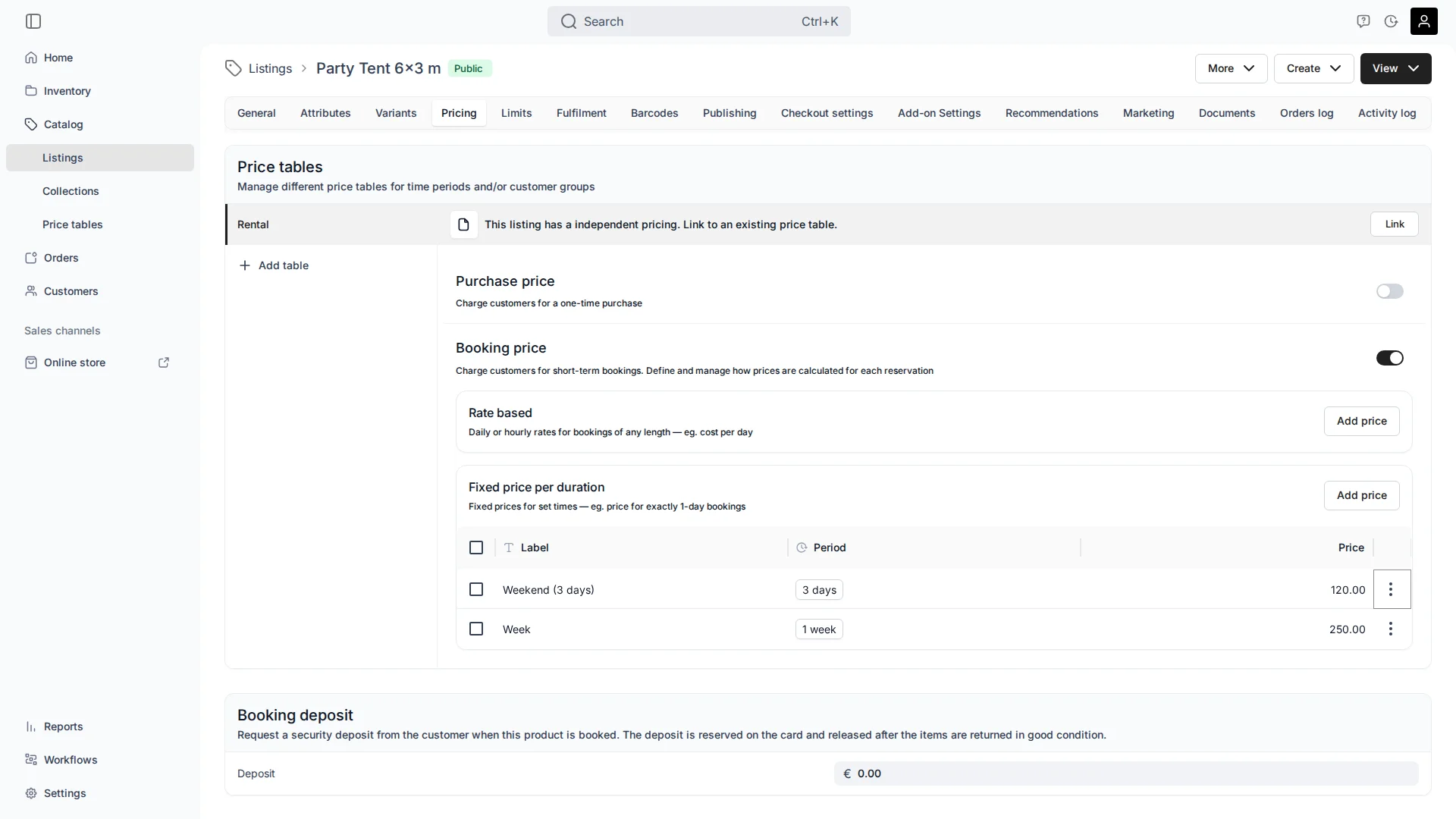
Weekend (3 days) is €120 and Week is €250. Fixed packages are ideal when the duration is the product — a weekend hire, a seven-day rental — and you don’t want it broken into day rates.
Restrict when a package sells: the Weekender
A “Weekend (3 days)” package only works if it starts on a Friday — otherwise someone books a “weekend” running Tuesday to Thursday. Open the package’s Advanced settings and switch off every weekday except Friday.
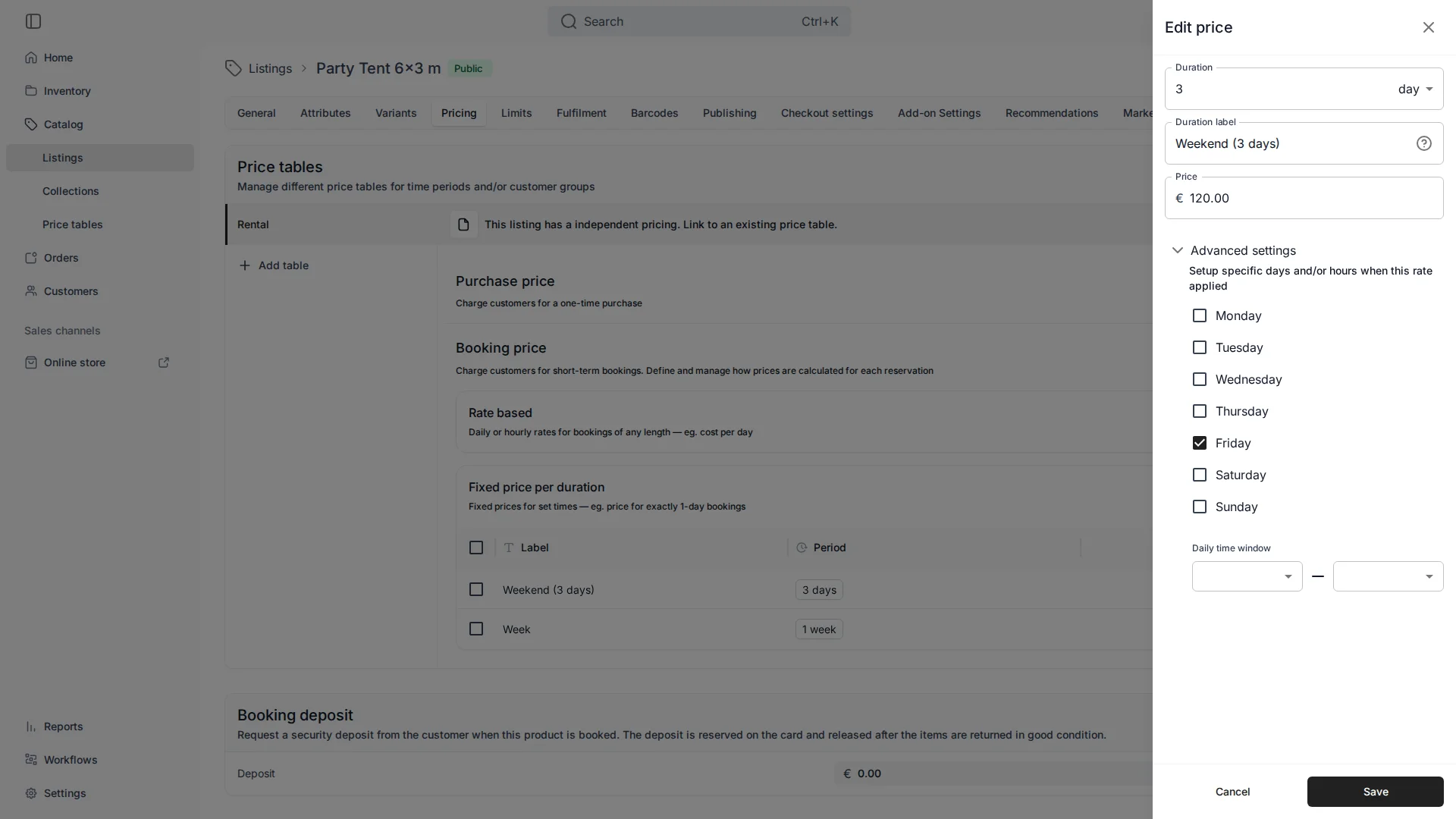
Now the package is only offered to start on a Friday — a true Fri–Sun Weekender. The same panel has a Daily time window, so you can also pin a rate to, say, evenings only.
Weekends cost more: weekday rules on rate-based rows
The identical weekday panel appears on rate-based rows, which is how you make “weekends cost more.” But there’s a catch, and it’s the same one that governs all TWICE Commerce pricing: at checkout every active row competes, and the engine builds the cheapest valid coverage of the booking (see Seasonal and Tiered Rental Pricing).
So you can’t just add a pricier weekend row on top of your normal daily rate — the cheaper weekday row would still cover Saturday and win. The two rows must not overlap on days:
- Standard day row — restricted to Mon–Fri.
- Weekend day row, priced higher — restricted to Sat–Sun.
Now each day has exactly one row that covers it, so Saturday is charged at the weekend rate because nothing cheaper applies. The rule of thumb: to charge more for a slot, the cheaper row must not reach it. That’s weekday restriction doing the same job that date-scoping does for a seasonal surcharge.
Mind the gaps: the fallback price
Restricting rows by weekday or time can leave a slot with no matching row. For that, a rate-based table has a fallback price — the rate used when nothing else covers a period. If several fallbacks could apply, the cheapest is used. If you split your rows into weekday-only and weekend-only, set a fallback so an unusual booking never lands on “no price.”
A few common questions
What does unchecking weekdays on a package actually do? It limits when that price applies — for a fixed package, which day it can start on. Leave only Friday checked and it’s a Friday-start package.
Can I make weekends cost more by adding a higher weekend row? Only if the cheaper everyday row doesn’t also cover weekends. Restrict the standard row to weekdays and the higher row to weekends so they don’t overlap — otherwise the cheaper one wins.
Can I set an evening or morning rate? Yes — the Daily time window on a row pins it to a time range, the same way weekdays pin it to days.
What happens if a booking hits a time with no matching row? The fallback price covers it. Set one if your weekday/time rules leave gaps.
Do these rules work on shared tables too? Yes — weekday, time, and fallback settings live on the rows, so they apply whether the table is standalone or shared across many Listings.
Why does my higher weekend/evening rate sometimes not apply? A cheaper row still covers that slot. The engine takes the cheapest coverage, so the pricier row only wins when it’s the only one covering those days or hours.
The One-Sentence Summary
If you remember one line:
Weekday and time rules let a row apply only when you want — but to charge more for a slot, make sure the cheaper row doesn’t reach it.
Setting these up so they actually fire — non-overlapping rows, sensible fallbacks, packages that only sell when they should — is one of the things we work through in a session, so your edge-case pricing behaves on the storefront.