When you register a new product in TWICE Commerce, you make one decision that quietly shapes the rest of your operations: do you track every physical unit individually, or do you group identical units together as a pool?
The platform calls these two modes serialized (one record per unit) and pooled (one record for many identical units). Both work. They give you different things in return.
The one question that decides it for you:
Do I care if this specific item generated revenue — or just that one of these items did?
If you care about the individual unit’s story — its income, its repair history, where it has been, whether it’s pulling its weight — track it serialized. If you only care that the pool as a whole is performing, pooled is fine.
A concrete example: skis are almost always serialized. Helmets almost never are.
What Each Mode Actually Gives You
The two modes are not just a UI preference. They produce different shapes of data for the entire life of the item.
Serialized (quantity = 1, one record per unit):
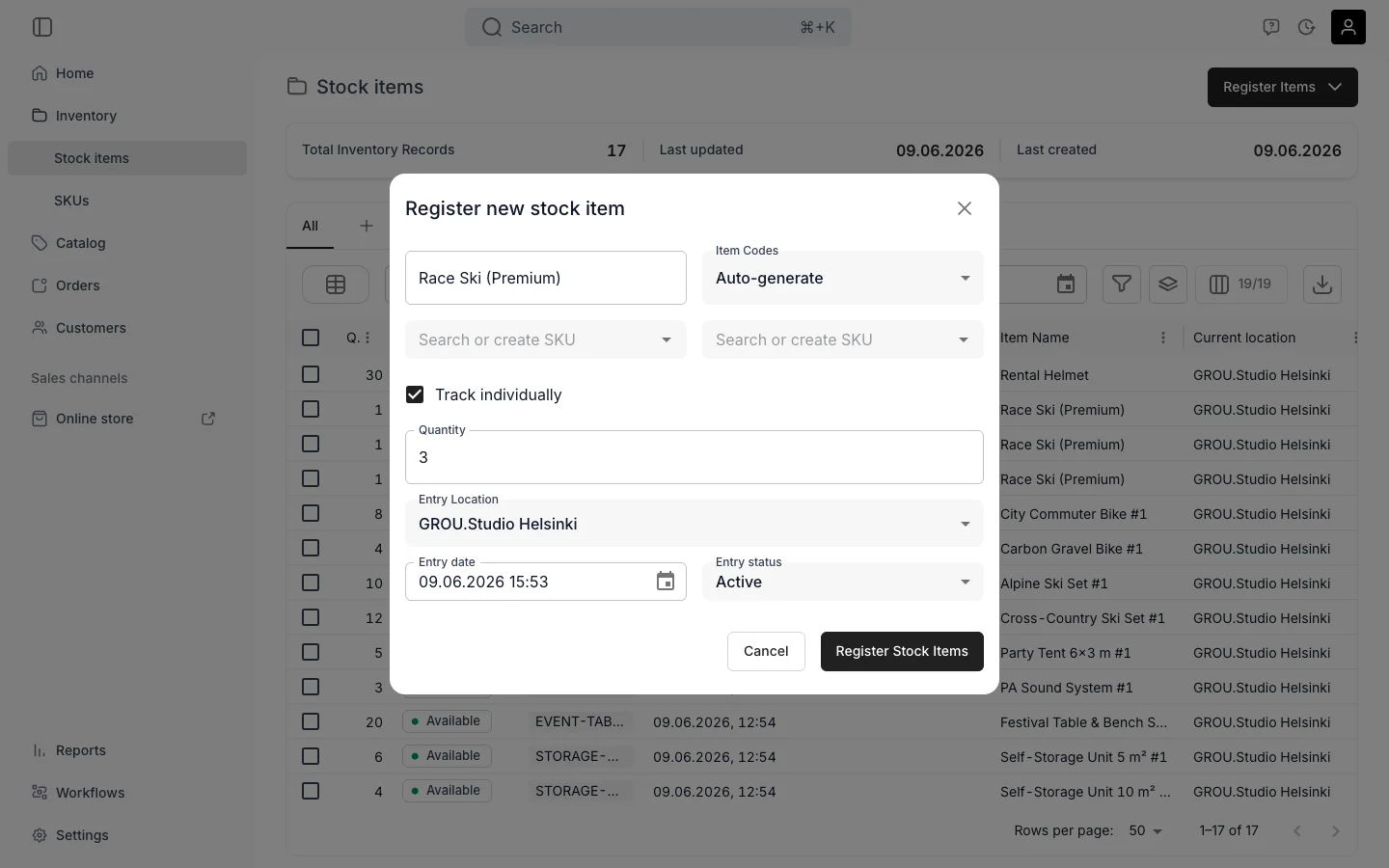
- Each unit has its own item code(s) — internal code, manufacturer serial, printed barcode, all on the same record
- Each unit has its own ledger: which orders earned revenue against it, what repairs cost
- Each unit has its own condition, location, and maintenance history
- Each unit has its own state (In with you / Out with a customer) and lifecycle status (In use / Out of use / Lost / Sold)
- You can pull per-unit profitability and identify under-performers
Pooled (quantity = N, one record for many units):
- One record, one set of codes for the whole pool
- One aggregated ledger — the pool’s total income and total cost
- One condition value, one status for the whole pool
- State is tracked as a count: “47 In, 3 Out” rather than per unit
- Reporting is pool-level only
The same SKU can hold a mix of both. A premium-helmet SKU might have 50 standard helmets pooled and three high-end helmets tracked individually because they matter enough.
The Decision Rubric
Run any new product type through these four questions before you register it:
-
Is it rentable — does it go out with a customer and come back? If yes, lean serialized. The In/Out state model and the handed-out / returned events on the timeline only earn their keep when each unit is its own record.
-
Does it have a serial number or asset tag you care about? If yes, serialized. You can attach multiple codes to a single serialized item (internal code + manufacturer serial + barcode), and any of them will find the item when scanned.
-
Does it depreciate, need maintenance, or have a warranty? If yes, serialized. A bike that’s been serviced three times is not the same asset as one that hasn’t. Pooled tracking flattens that information.
-
Are these identical, interchangeable, low-value units where the customer doesn’t care which one they get? If yes, pooled is fine — and probably smarter. A bin of 200 carabiners does not need 200 records.
If you’re still unsure, default to serialized. You can always treat a serialized item as if it were pooled (group it in reports by SKU). The reverse is much harder.
Use Serialized For
- Bikes, skis, snowboards, surfboards, e-scooters
- Cameras, drones, lighting rigs, audio gear
- Power tools and high-value construction equipment
- Anything with a serial number that matters
- Anything where you want item-level ROI
- One-of-a-kind or vintage items
- Refurbished items where condition varies between units
- Items subject to compliance or audit traceability
Use Pooled For
- Helmets, locks, lanyards, cable ties
- Generic accessories that customers want one of, not a specific one
- Consumables: packaging, fuel canisters, single-use tickets
- Low-value items where item-level history adds nothing
- Sales-only stock with no per-unit lifecycle to track
The One-Way Door (Read This Before You Click Save)
There is no in-place conversion between modes. The choice is made at creation, on a per-item basis, via the Track individually checkbox in the Register stock items dialog.
If you change your mind later, you can’t just flip a switch. You have to:
- Create new records in the target mode
- Retire the originals by setting their status to Out of use
Historical income and cost on the retired records is preserved — it still rolls up under the SKU in reports — but the records themselves stop accepting new orders. It’s not destructive, just clunky.
This is why the decision matters at registration. A few minutes of thought now saves a migration later.
The Common Pattern
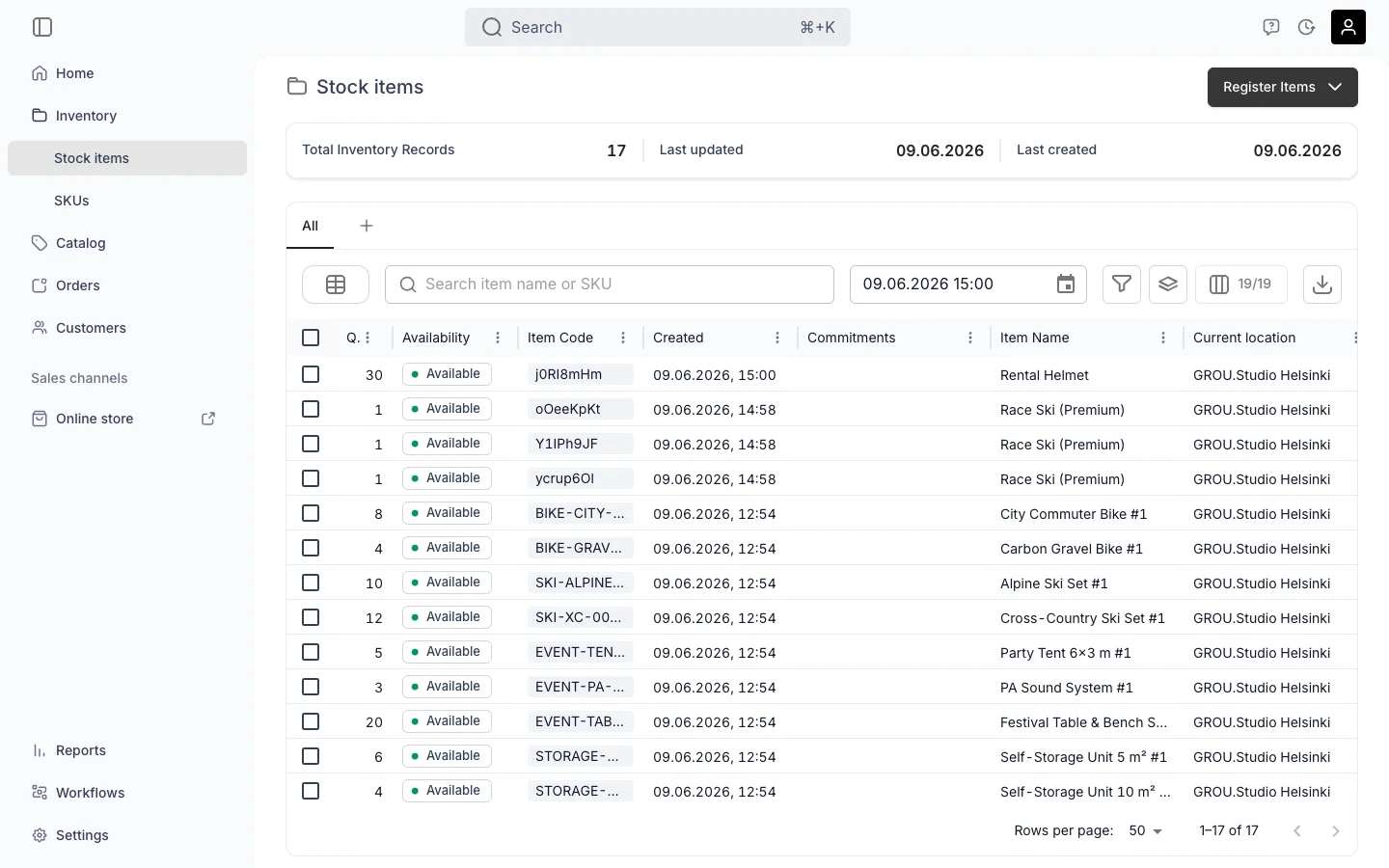
Most TWICE Commerce shops we work with end up running both modes side by side. A bike rental might look like this:
- Serialized: the bike fleet itself, every unit individually tracked
- Pooled: helmets, locks, panniers, repair kits — everything the customer adds to the rental but doesn’t really care about per unit
That split lets you answer two different operational questions cleanly. “Which bikes are earning their keep?” runs against the serialized fleet. “How many helmets do we need to reorder?” runs against the pool.
You don’t have to pick one philosophy for the whole shop. You pick per item type.
A Few Common Questions
Can I convert serialized to pooled or vice versa? Not in place. Create new records in the target mode and retire the originals via status. Historical data stays attached to the retired records and continues to count toward SKU-level reports.
Can a single SKU contain both serialized and pooled items? Yes. The SKU is just a product template — Stock Items under it can mix modes freely. SKU rollups sum across both.
Does pooled inventory support reservations? Yes. A reservation on a pool consumes N units rather than pinning a specific unit. The pool’s available-to-sell during the reservation range drops by N.
Will availability work the same in the online store either way? Both modes feed the same availability engine — the customer sees the same thing. The difference is what you see when you open the item in admin.
Getting It Right From Day One
Picking the right tracking mode per product type is one of those small decisions that compounds. Every report, every per-unit ROI question, every maintenance log, every refurbishment workflow — they all read more cleanly when serialized is reserved for items where the per-unit story matters and pooled is reserved for the bin of carabiners.
If you’re setting up your catalog from scratch, this is exactly the kind of thing we walk through in the setup session — your products, your operations, and which mode each item type should land in before you click register on a thousand of them.