Everyone new to TWICE Commerce hits the same wall in the first hour. The admin has Stock Items, SKUs, and Listings — three menu items that all sound like “the product.” Most other ecommerce tools only have one. So which one is which, and why are there three?
Here’s the cheat sheet, in one sentence each:
Stock Item = the physical thing you own. SKU = the template describing what kind of thing it is. Listing = what the customer sees and buys.
That’s the whole model. Everything else is detail. The reason there are three is because rental businesses need to keep these three things separate — one bike can power a daily rental, a weekly package, and an outright sale at the same time, and you need a clean way to track which physical bike, of what type, was committed to which offer.
The rest of this tip walks through each layer, the connection between them, and the one thing that trips up almost everyone.
Stock Item — What You Own
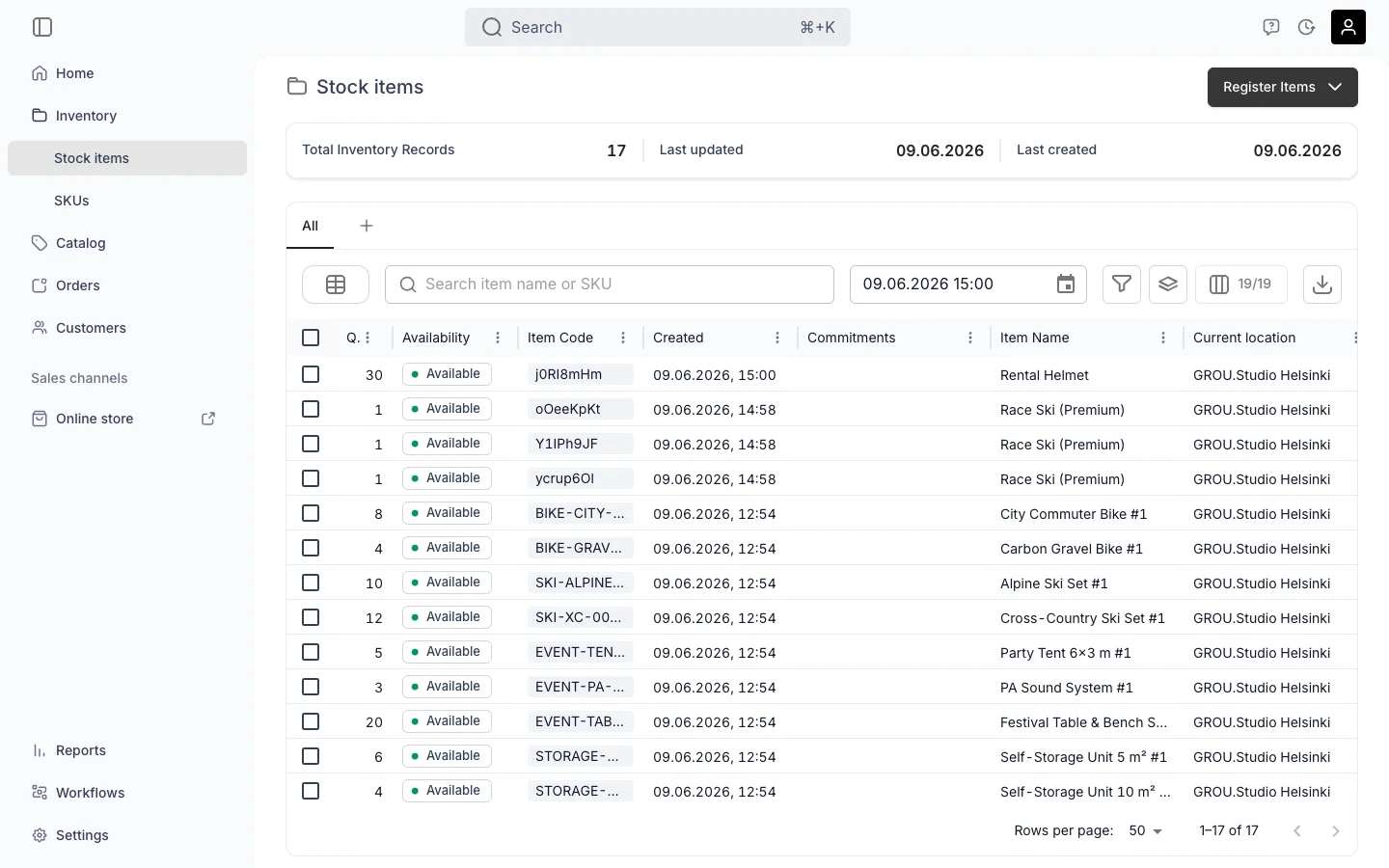
A Stock Item is the unit of inventory you actually own. One physical thing in the world (a specific bike, with a specific frame number) corresponds to one Stock Item in the admin.
Each Stock Item carries:
- Its own item code(s) — internal code, barcode, manufacturer serial
- A location — which service location it lives in
- A condition — New, Good, Fair, whatever you decide to track
- A ledger — every euro it has earned and every euro it has cost
- An event timeline — every rental it has been on, every repair it has had
This is the “passport” layer. If a bike has been rented 47 times and serviced twice, that history lives on the Stock Item.
If you’re pooling identical low-value items (helmets, locks) into a single quantity > 1 record, that’s still a Stock Item — just one record representing the pool instead of one record per unit. We covered that distinction in Serialized or Pooled Inventory in TWICE Commerce.
You find Stock Items under Inventory → Stock Items.
SKU — The Template
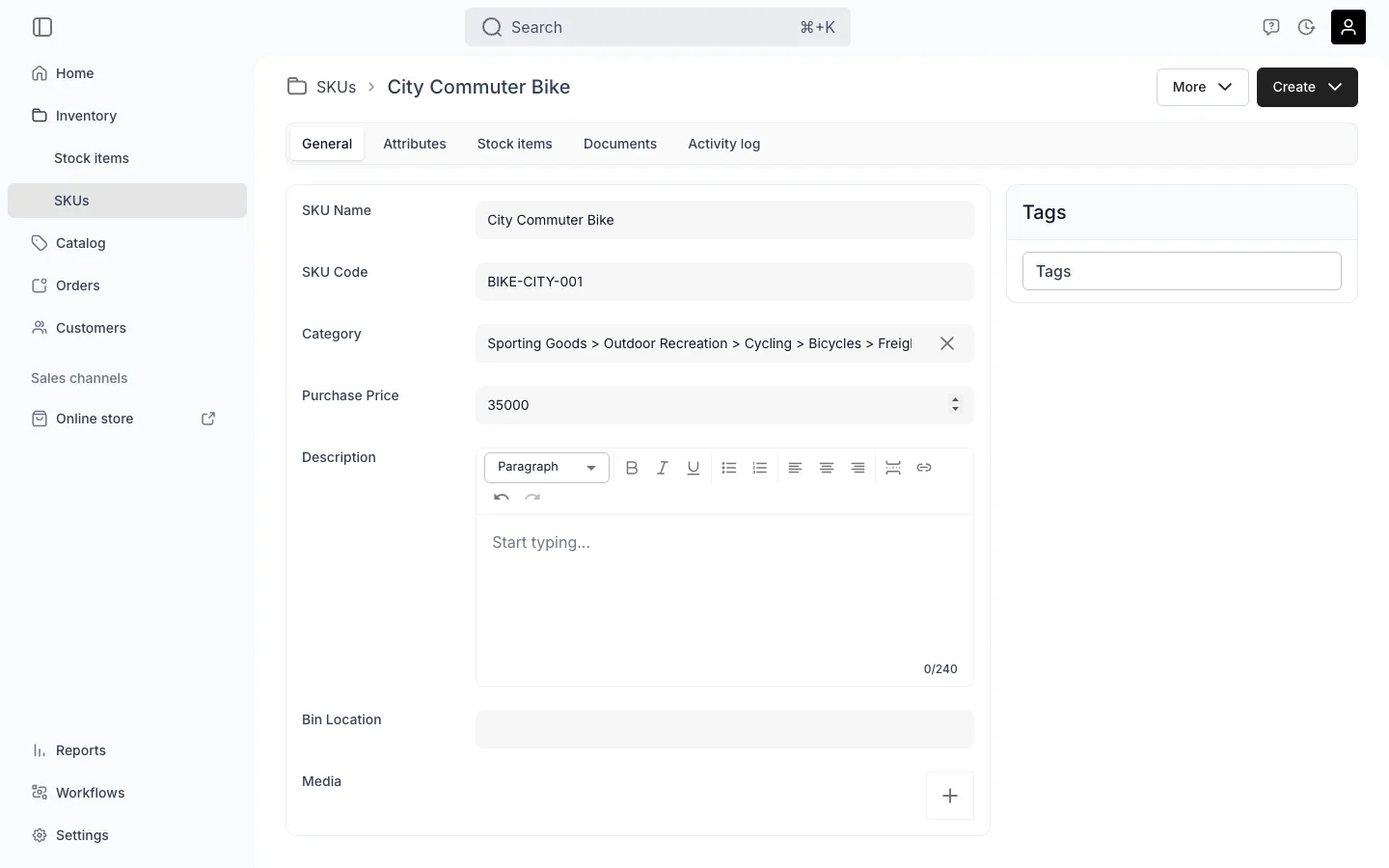
A SKU is a template for a type of thing. It does not hold inventory itself. You can think of it as the row in a product catalog spreadsheet — name, code, category, base price, attributes, description — that gets stamped onto every Stock Item linked to it.
Example. You create one SKU:
- Name: Bike S
- Code:
BIK-S - Category: Bicycles → City
- Attributes: Brand: Trek, Frame size: S
- Purchase price: €499
Then you register 20 Stock Items linked to that SKU. Each of those 20 physical bikes automatically inherits the category, the brand, the frame size, and the purchase price. Update one field on the SKU later, and all 20 items update at once.
A SKU has no quantity. It has no location. It has no ledger. It is just the definition of a product type. The actual quantity is the count of linked Stock Items.
Key things to know:
- A Stock Item can be linked to a SKU — it doesn’t have to be. One-off vintage items can sit without a SKU.
- Inheritance is a default, not a lock. The Stock Item can override any field individually.
- One SKU can have a mix of serialized and pooled Stock Items underneath it.
You find SKUs under Inventory → SKUs.
Listing — What the Customer Sees
A Listing is the store-window version of your product. It’s what shows up in your online store. It’s what staff pick when creating an order in the admin. It is the unit of merchandising, not the unit of inventory.
A Listing carries:
- A customer-facing name and description
- Photos, video, marketing copy
- One or more Price Tables — daily/weekly/monthly rental rates, optional sale price
- Optional variants — size, colour, frame size
- A URL slug, SEO title, OpenGraph image — proper website stuff
- A fulfillment rule — which says how this Listing pulls from inventory
- Sales channel toggles — Online Store / Admin / Check-in
- A list of locations it can be fulfilled from
A Listing does not have a quantity field, and it does not point to a specific Stock Item. Availability is computed in real time by reading the fulfillment rule, finding matching Stock Items, and subtracting current reservations.
You find Listings under Catalog → Listings.

The Connection — Fulfillment Rules, Not Foreign Keys
This is the part that trips up almost everyone, so it deserves its own section.
In a normal ecommerce system, a “product” points to a specific inventory record. A Listing in TWICE doesn’t work that way. The Listing has a fulfillment rule that says something like:
“To fulfill this Listing, reserve 1 Stock Item whose SKU code is
BIK-Sand whose frame size attribute isS.”
At order time, the rule resolves against actual Stock Items. Whichever matching units are free, the system picks one. The Listing never names a specific bike — it names a pattern and lets the inventory layer figure out which physical unit to commit.
This indirection is what makes the next two things possible.
One Bike, Three Listings
Take one physical bike (one Stock Item) linked to the BIK-S SKU. You can sell it through three different Listings at the same time:
- Listing A: “Bike — daily rental” — €40/day, with a daily-rate Price Table, published to the online store.
- Listing B: “Bike — weekly package” — €180/week, with a different Price Table, published to the online store.
- Listing C: “Bike — for sale” — €399 outright, published only to in-store check-in.
All three Listings have the same fulfillment rule — “match Stock Items where SKU code = BIK-S.” Whichever Listing the customer picks, the same physical bike gets reserved. No duplication, no separate inventory.
This is the reason for the three-layer model. Without it, you’d be forced to copy your inventory once per rate plan, then desperately try to keep them in sync. With it, the inventory lives in one place and the offers stack on top.
One Listing, Many SKUs
The other direction works too. Imagine a single Listing called “Bike Rental — any size” with a size variant axis. The fulfillment rule on the Listing says:
“Match Stock Items whose SKU code is
BIK-S,BIK-M, orBIK-L, depending on which variant the customer picked.”
One Listing, three SKUs underneath, possibly dozens of Stock Items underneath those. The customer sees one product page with a size dropdown; the inventory layer sorts out the rest.
One Listing, a Bundle
The same fulfillment-rule layer is what makes bundles trivial to set up. A Listing can have more than one rule — each one reserves a different kind of Stock Item from the inventory pool.
Take a “Party Set for 8” Listing. Two rules on it:
- Rule 1: reserve 1 Stock Item where SKU code =
EVENT-TABLE-001 - Rule 2: reserve 6 Stock Items where SKU code =
EVENT-CHAIR-001
The customer sees one product, one price, one date range. Behind the scenes, 7 physical items get committed to the order. If any one of them isn’t available for the requested dates, the whole bundle is unavailable — that’s the rule engine doing the right thing automatically.
You’re not duplicating Listings, and you’re not creating a fake “Table + Chairs combo” SKU to hold the bundle. The bundle composition lives entirely in the Listing’s rules, on top of the same Stock Items that any other Listing can also pull from. The table is still rentable on its own through the regular “Festival Table” Listing — adding it to a bundle doesn’t lock it up.
Common Mistakes
A few patterns we see when shops set up TWICE Commerce for the first time:
Treating a SKU as the customer-facing thing. SKUs are internal. Customers never see them. Names and descriptions on a SKU are for staff and inheritance — the storefront pulls from Listings.
Treating a Listing as inventory. A Listing has no quantity. If you find yourself trying to “add stock to a Listing,” what you actually need is more Stock Items matching that Listing’s fulfillment rule.
Creating one Listing per rate plan, all pointing at duplicated inventory. Don’t. Create one Listing with multiple Price Tables, or several Listings sharing one fulfillment rule. The inventory side stays single-source.
Skipping the SKU layer entirely. Sometimes fine for one-offs. But once you have more than three of the same physical thing, a SKU pays for itself — bulk attribute edits, cleaner reporting, faster registration of new units.
A Few Common Questions
Do I have to create SKUs?
No. skuId is optional. One-off items can sit without a SKU. You lose inheritance and cross-item rollups, but the item still has its own ledger and history.
Can a single SKU power multiple Listings? Yes — and this is the common case. Daily rental, weekly package, and outright sale of the same product type can all share one SKU.
Can a single Listing resolve to multiple SKUs? Yes. Use variants and write the fulfillment rule to match the relevant SKU codes per variant value.
Where does pricing live — Listing, SKU, or Stock Item? Listing. SKUs have a default purchase price (what you paid). Stock Items inherit that. The customer-facing price lives on a Price Table attached to the Listing, never on the SKU or the Stock Item directly.
If I delete a SKU, what happens to its Stock Items?
They become unlinked (skuId goes to null). Their own data — codes, ledger, events — stays. They just lose the inherited defaults.
What about the SKU code on a printed barcode? SKU codes identify the product type. Stock Item codes identify a specific physical unit. If you scan a barcode, you usually want the Stock Item code, not the SKU code.
The One-Sentence Summary
If you only remember one line from this article:
Stock Items are what you own. SKUs are what kind of thing they are. Listings are what the customer buys.
When you’re setting up a TWICE Commerce store from scratch, the order is usually: define your SKUs, register your Stock Items against them, then build Listings on top. That’s the sequence we walk through in the setup session — including which fulfillment rules to write and how to structure your catalog so it scales without copy-pasting inventory.